Everything you are working on, and everyone who owes you money, in one file
If you do work for clients you already know where this goes wrong. The work is in your head, the invoices are in your email, and the thing you forgot is the thing that was late. This is one Excel file that holds all of it — clients, projects, tasks, invoices, leads and costs — with a dashboard on top that fills itself in as you type.
One-time purchase · free updates to this file · no macros, nothing locked
The admin is not the job, but it decides whether the job pays
Project software is built for teams with a project manager. Accounting software handles the invoice but knows nothing about the work. Most people doing client work end up with neither, and a folder of spreadsheets that disagree with each other.
This is the third option: one file, already formatted, that answers the four questions that actually cost money — what am I owed, what is late, what am I working on, and did that job make anything.
It fills itself in while you type
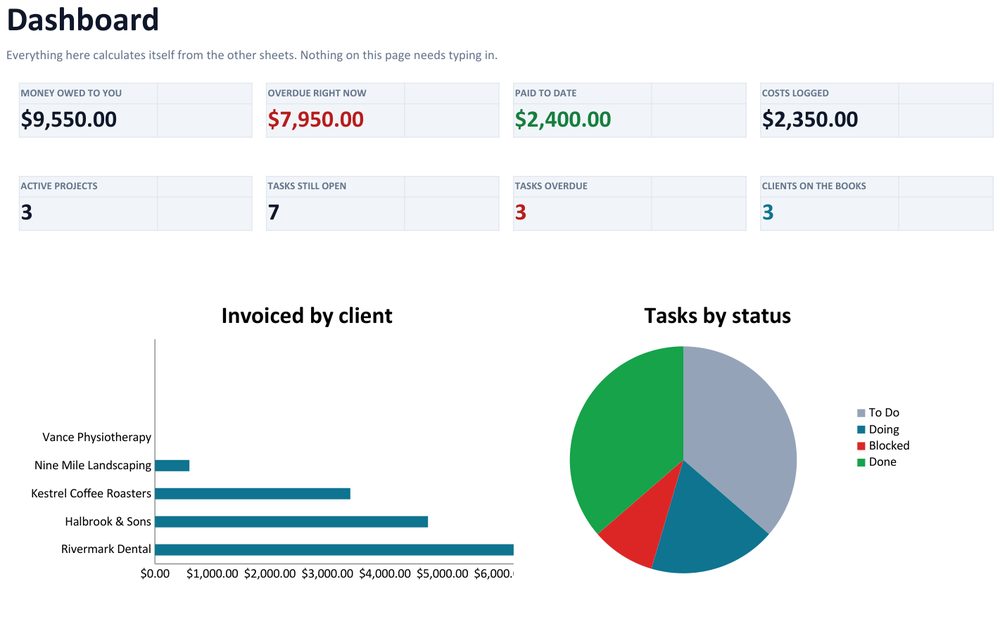
You never build the dashboard. Add a client, a project, a task or an invoice on its own tab and every figure here updates: what you are owed, how much of that is overdue, what you have been paid, what your costs are, which projects are live, which tasks are late, and who on your team is buried.
There is nothing to type on the dashboard itself. It is the page you open on a Monday.
Red means late, and you did not set that up
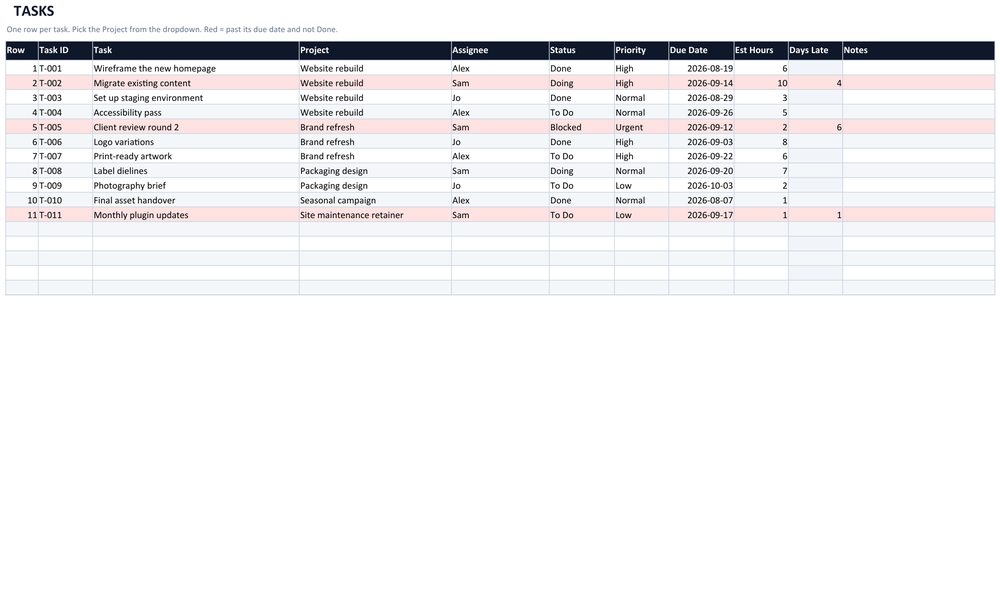
Give anything with a deadline a due date. Anything past its date and not finished turns red on its own, across the whole row, and the count on the dashboard follows. Mark it Done and the red clears.
No conditional formatting to configure, no rules to write. Every one of the thousand rows is already formatted — you never copy a formula down or extend a table.
Chase what is unpaid without opening your email
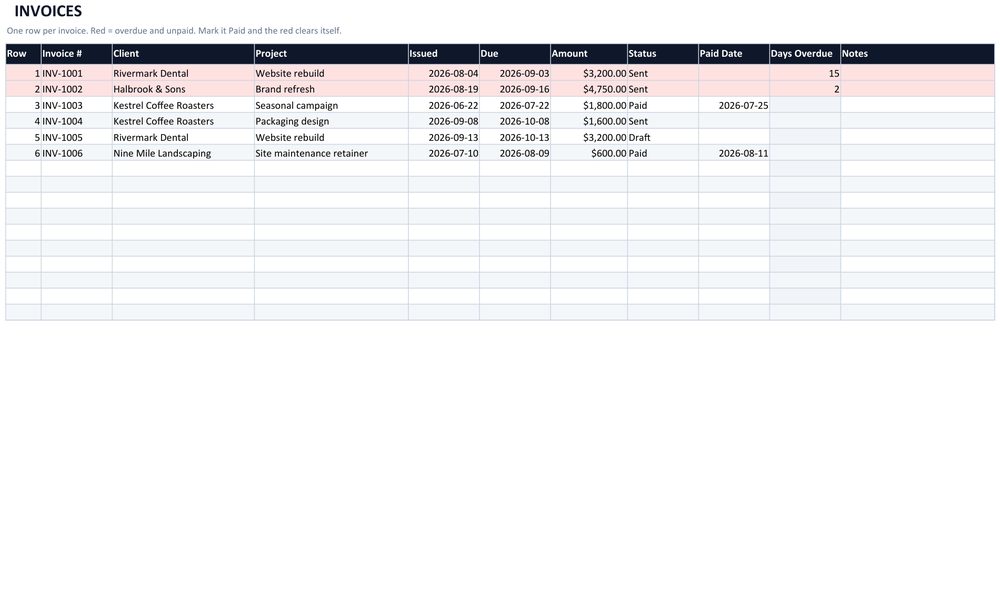
Log what you send. Anything past its due date and not paid goes red with the number of days it is late beside it. Type Paid in the status column and the red clears, the dashboard's overdue figure drops, and the paid figure rises — all from that one cell.
Six months of projects on one screen
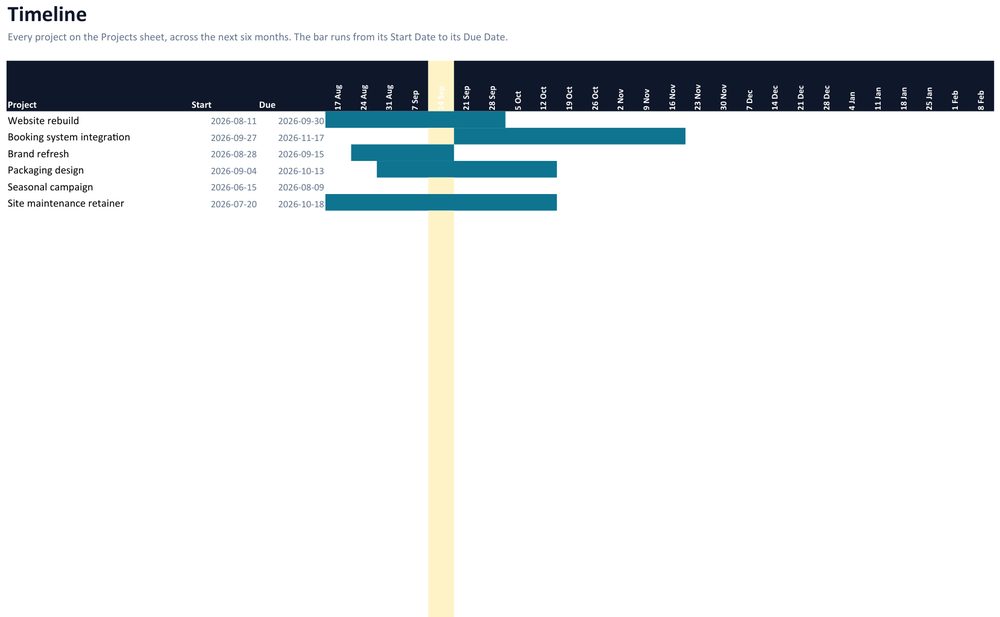
Every project on the Projects sheet drawn as a bar from its start date to its due date, six months across, with this week marked. It is a Gantt chart that needs no Gantt software and updates itself when you change a date.
Work out what to charge before you say a number
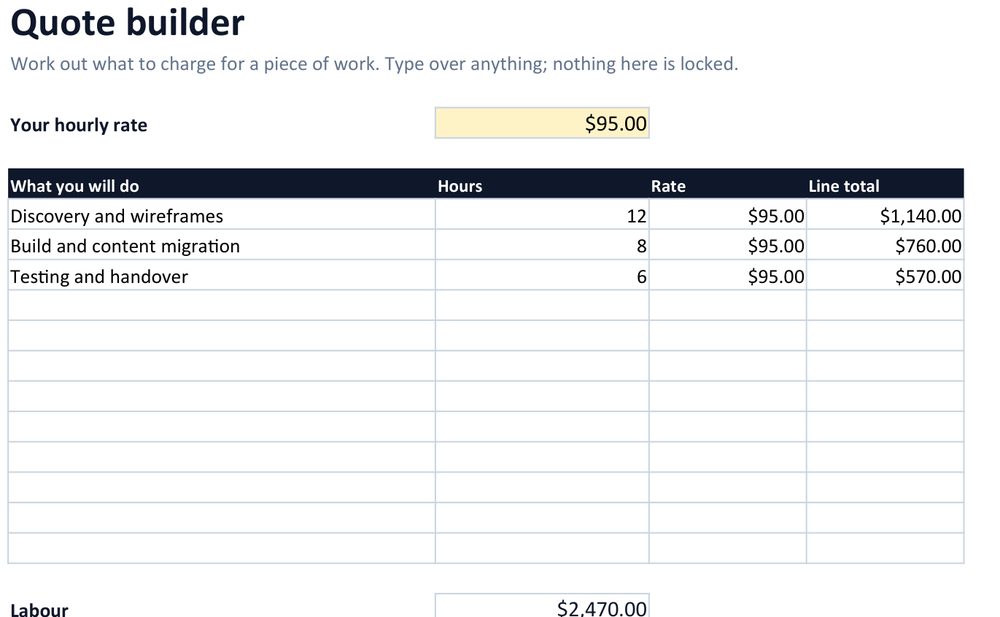
Put in your hourly rate, the pieces of work and the hours each will take, anything you are passing on at cost, and a contingency percentage. It totals the lot and gives you one figure to quote. The yellow cells are the ones you change; everything else works itself out.
Twelve tabs, and you will use about five
- Dashboard — what you are owed, what is overdue, who is busy. Calculates itself.
- Clients — who you work for, and what each one is worth.
- Projects — budget, progress and profit per job.
- Tasks — the work itself. Red when it is past its due date.
- Invoices — sent, paid, overdue.
- Leads — work you are chasing but have not won, amber when a follow-up slips.
- Expenses — tag a cost to a project and see real profit, not just revenue.
- Timeline — every project across six months.
- Quote — hours, costs and contingency, totalled.
- Lists — every dropdown option, yours to rename.
- Import — bringing in data you already have.
- Start Here — the short version of the guide, inside the file.
What people complain about in spreadsheets like this, and what we did
- No macros. None at all. Nothing to enable and no security warning, so it opens on a locked-down work machine.
- No function newer than Excel 2016. No XLOOKUP, no dynamic arrays. It will not break on an older copy, and the build fails if one sneaks in.
- Nothing is locked. No protected sheets, no password. Every dropdown reads from a Lists tab you can edit — rename a stage, add your own, delete the rest.
- Nothing to set up. A thousand rows per sheet are already formatted. You never add a row, copy a formula down or extend a table.
- Add your own columns. It is your file.
Three files, instantly
- Client & Project Tracker.xlsx — the one you use, empty and waiting.
- Client & Project Tracker - DEMO.xlsx — the same file filled with example data, so you can see it working before you touch yours.
- Quick Start Guide.pdf — four pages, plain English, no jargon.
Tested in Excel (Microsoft 365), Google Sheets and LibreOffice. Built as a plain .xlsx with no macros and no function newer than Excel 2016.
One-time purchase · instant download · free updates to this file
Questions people ask
Is this the same as your equipment trackers?
No, and it is not a cheaper version of them. Those track equipment — laptops, tools, A/V
gear — and include an interactive dashboard that runs in a browser. This tracks client
work and money: projects, invoices, leads and profit. Different tool, different job.
Does it work in Google Sheets?
Yes. Upload it to Drive and open it with Sheets; it was tested that way. The formatting and
formulas carry over. Excel is where it looks its best.
Can two of us use it at once?
Put it on OneDrive, Dropbox or Google Drive and you can share it. It is a spreadsheet, so one
person edits at a time unless you use Google Sheets. If you need several people in it all day,
you want a database, not this.
Can I add my own columns?
Yes. Nothing is protected. Add them to the right of the existing ones so the built-in sums keep
working.
I typed over a formula by mistake.
Press Ctrl+Z. If you have saved and closed, re-download your copy — your data sheets are
separate from the calculations.
Is there an interactive dashboard like the other trackers?
Not in this one. The dashboard here is a sheet inside the workbook that calculates itself. It is
honest to say so up front rather than after you have paid.
One file, one payment
Everything you are working on, and everyone who owes you money, in one place that does not send you a bill every month.